Many medical practices run patient intake on Jotform, and many more consider it. This page compares Jotform with Mira Operations in detail, and brings in Phreesia where the comparison is useful, since it is the product most clinics evaluate alongside both. Mira publishes this page, so read it knowing the source; the factual claims are checkable against each vendor’s own documentation.
The most useful framing up front: Jotform is a form builder, and Mira is intake software. Those categories overlap at exactly one point, the moment a patient fills out a form. Everything before and after that moment is where the two products differ.
The paperwork neither of them touches: disability and FMLA forms
Before the form-builder comparison, it’s worth covering the paperwork category that no form product handles, because for many practices it’s the biggest single time sink: forms that arrive from someone else. FMLA certifications, short-term disability carrier forms, workers’ comp paperwork, return-to-work letters, CMS forms. The employer or carrier controls the layout, so the practice can’t digitize them into a web form. Someone on staff fills them in by hand, form by form, and a busy orthopedic practice sees a steady stream of them.
Mira has a dedicated tool for this, and it’s the part of the product practices tend to adopt first. The idea is that by the time a disability form shows up, the patient has usually already told the practice everything the form asks: on their registration, in their intake interview, across earlier fills. Mira treats all of it as source material and maps it onto the new document, whatever the layout. The workflow:
- Staff opens the patient and uploads the payer’s PDF or a photo of it. Scans and faxes work, so a crooked photocopy of a 2000-era state form is handled the same way as a clean carrier PDF.
- Mira locates every blank, checkbox, and signature line on the document, titles the form, and classifies it (disability, FMLA, CMS, insurance).
- Every blank the patient’s history can answer gets filled: demographics from the chart, dates and symptoms from intake answers, coverage details from earlier forms and uploaded documents. On a typical carrier form, that is nearly all of it, and what’s left is genuine judgment (a return-to-work date, a work-restriction opinion). The matching runs under a strict no-guess rule: anything the record doesn’t clearly state is flagged rather than fabricated, and the review screen reports the split explicitly. Forms built almost entirely of clinical judgment, like a physician’s statement, flip the ratio, and Mira says so rather than pretending.
- Staff glances at the flagged items, a saved signature drops in, and the completed PDF renders onto the original document, so what goes back to the carrier looks exactly like the form they sent.
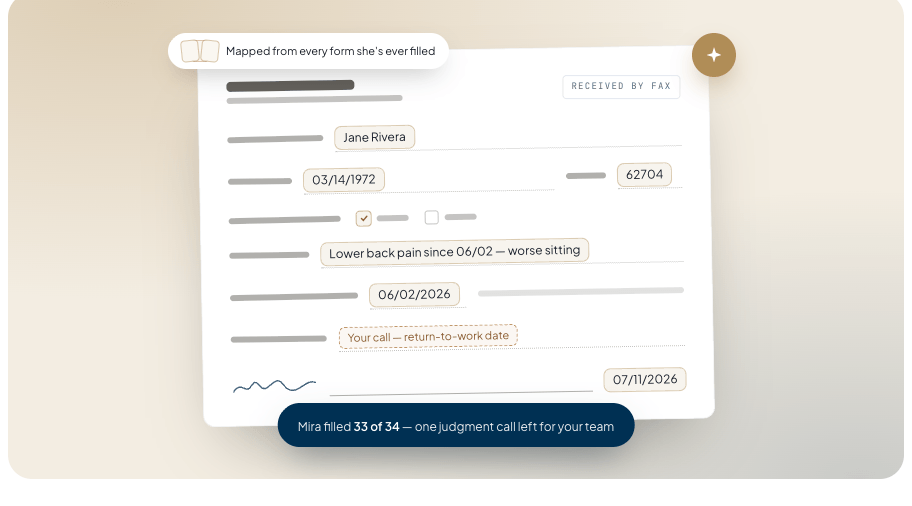
Two details matter for regular use. Corrections are remembered: if staff nudges a box on a new form, Mira stores the layout for that document, and the next fill of the same form opens ready to review. And pricing is usage-based at $5 per completed form, with a ledger of every fill, separate from any subscription.
Neither Jotform nor Phreesia offers this category at all. If your practice’s pain is specifically disability and FMLA paperwork, this section is the comparison.
What Jotform is
Jotform is a general-purpose online form builder, one of the largest. You assemble forms in a drag-and-drop editor from a catalog of field types, or start from one of several thousand templates. It supports conditional logic, file uploads, e-signatures, payment collection, and integrations with common business tools. Submissions land in an inbox, can trigger email notifications, and can be exported to spreadsheets or turned into PDFs.
For healthcare use, the relevant detail is how HIPAA is packaged. Jotform’s free and lower-priced tiers do not include a business associate agreement. HIPAA features and the BAA come with its HIPAA-enabled plan, which starts at $129 a month (Gold). On that plan, form data is encrypted and access-controlled in the ways a covered entity needs.
What the plan does not change is the product category. A HIPAA-enabled Jotform is still a form builder. After a patient submits:
- A staff member reads the submission and types it into the EHR. Jotform has no EHR write-back.
- Each submission stands alone. There is no patient record connecting this visit’s form to the last one, so a returning patient re-enters everything.
- The form itself is static. Every patient sees every field, regardless of what they came in for.
- Insurance details are collected as text. Nothing checks whether the member ID is valid or the plan is active.
- Paperwork that arrives as someone else’s PDF, such as disability certifications or FMLA forms, is out of scope entirely.
None of these are defects. They are the boundaries of the category Jotform competes in, and for general-purpose forms (surveys, registrations, applications) the product is capable and inexpensive.
What clinic intake actually involves
It helps to name the workflow the software is supposed to cover, because “intake” is bigger than “forms.”
A patient books a visit and receives forms. Some finish them at home; some abandon a long form partway and end up on a clipboard in the waiting room. The front desk transcribes answers into the EHR, where a mistyped date of birth or drug allergy becomes a chart error. Insurance is verified, either by a staffer calling the payer (a 10 to 15 minute call per check) or by software running an eligibility transaction; a missed check often surfaces weeks later as a denied claim. Reminders go out, or don’t, and no-shows follow. After the visit, employer and payer paperwork arrives as PDFs that someone fills in by hand.
A form builder addresses the first step. Intake software is judged on the rest.
What Mira Operations is
Mira Operations is patient-intake software for clinics, mostly orthopedic and surgical practices today. Its pieces map to the workflow above.
Forms and setup. Forms can be built five ways: describe the form in a sentence and AI generates it, upload a PDF or photo of an existing form and Mira rebuilds it field by field, start from a template library, build manually in an editor, or configure an adaptive interview (below). The rebuild-from-document path is how practices usually migrate: the paper packet or the old Jotform gets photographed or exported and recreated as native forms, typically in an afternoon.
The patient side. Forms render in the practice’s own branding. Patients can type or dictate answers, photograph their insurance card to fill carrier and member ID fields, save partway and resume from a link, or complete forms on a clinic iPad in kiosk mode. Reminders go out by text and email with links back to the exact form.
Returning patients. Mira keeps a patient record across visits, called Passport. A returning patient verifies a code sent by text or email, their stored demographics, insurance, and history load in, and they confirm or correct rather than re-enter. The record also travels across practices that use Mira.
New-patient interviews. Instead of a static form, a practice can run intake as an adaptive interview. The patient describes the problem in their own words, typed or spoken, and the system asks follow-up questions the way a medical assistant on a pre-visit call would, staying on the clinically relevant path. A knee-instability complaint gets knee questions; it never sees the shoulder questionnaire. Providers configure this by writing a plain-English brief (what to learn, what must be captured, what tone to use) rather than building question trees.
Insurance. When a patient submits, eligibility and benefits run in real time against the payer, days before the visit. Prior-authorization requirements and copays surface while there is still time to act on them.
Into the chart. Intake data writes into the patient record. Mira integrates natively with Epic, athenahealth, ModMed, eClinicalWorks, NextGen, and DrChrono, and builds new EHR integrations in one to four weeks. Each submission also produces a PDF formatted to match the practice’s existing paperwork, rather than a generic export.
Payer and disability paperwork. Covered in detail above: any third-party PDF filled from the record, reviewed and signed by staff, at $5 per completed form.
Compliance. Every account includes a signed BAA. Patient data is encrypted, staff access to records is logged, and the AI features run on models that do not train on patient data.
Feature comparison
| Capability | Mira Operations | Jotform | Phreesia |
|---|---|---|---|
| HIPAA + signed BAA | Every account | Gold plan and up ($129/mo) | Yes |
| Patient record across visits | Yes (Passport) | No | Partial |
| Adaptive, conversational intake | Yes | No | Partial |
| Rebuild forms from PDF/photo | Yes | Partial (PDF import) | As an onboarding service |
| Real-time insurance eligibility | Yes | No | Yes |
| Writes into the EHR | Yes | No | Yes |
| Fills FMLA/disability payer PDFs | Yes ($5/form) | No | No |
| Voice answers | Yes | Partial | Partial |
| Text + email reminders | Yes | Partial | Yes |
| Typical buyer | Private practice | Any business | Health system |
Competitor capabilities reflect publicly available information as of July 2026 and change over time. Confirm current offerings with each vendor.
Where Phreesia fits
Phreesia is the established name in patient intake. It runs digital check-in, eligibility verification, payments, and patient communications, and it integrates with the major EHRs. Functionally it covers much of the same ground as Mira.
The differences are mostly structural. Phreesia sells to health systems and large groups: pricing is quoted rather than published, contracts are typically annual or longer, and implementations run through a project team. That model fits an organization with procurement and IT staff, and fits a five-provider practice less well. There are also specific capabilities Phreesia does not offer, notably filling third-party payer PDFs from the chart and the conversational interview format; its intake flows are structured screens.
Mira occupies the space between: intake coverage comparable to Phreesia’s, priced and packaged for private practices, with self-serve setup measured in days rather than an implementation calendar.
Costs
Jotform publishes its pricing: a free tier and per-user paid tiers for general use, with the HIPAA-enabled plan (Gold) at $129 a month, or $99 a month billed yearly. For a clinic, that plan is the relevant number, since the cheaper tiers lack a BAA.
Phreesia quotes pricing per organization and does not publish it.
Mira quotes per practice, since provider count and volume vary; the disability and payer form filling is a flat $5 per completed form regardless of plan. When practices compare costs, the informative comparison is rarely subscription against subscription. It is software cost against the staff hours currently spent transcribing, verifying, and filling paperwork by hand, plus the claims denied over eligibility problems that surfaced too late.
Which to choose
For forms that never touch patient data (surveys, event signups, hiring pipelines), Jotform’s free and low-cost tiers are hard to argue with, and none of the healthcare capabilities above matter.
For a clinic that mainly needs compliant digital forms and has front-desk capacity to do the rest by hand, Jotform’s HIPAA plan works. Go in knowing what stays manual: transcription into the EHR, insurance verification, returning-patient re-entry, and all payer paperwork.
For a health system with an implementation team, Phreesia is the incumbent for a reason, and enterprise structure may be exactly what a large organization needs.
For a private practice that wants the whole workflow handled (returning patients recognized, new patients interviewed, coverage verified before the visit, payer PDFs filled, and everything written into the chart), that is the product Mira Operations is. The fastest way to evaluate it is to bring one of your own forms to a demo and watch it rebuilt live.